MapsGL Android - Customizing radar color scale
This example swaps the radar layer’s color scale while the map is running — between the built-in per-precipitation-type scales, a custom set, and three generic palettes — with the legend on screen so you can watch it follow.
It is the Android port of the MapsGL JS Customizing radar color scale example. The complete activity ships in the MapsGL Android SDK demo as CustomRadarColorscaleActivity.
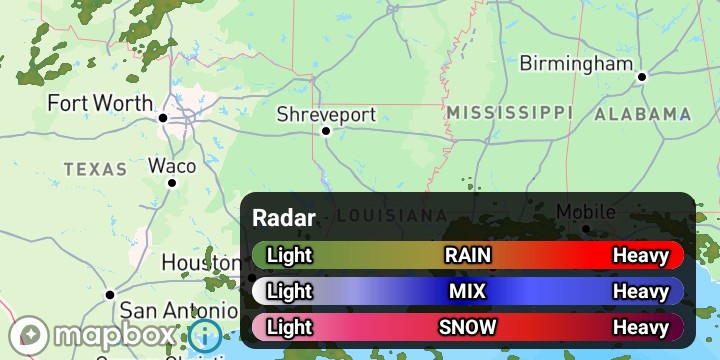
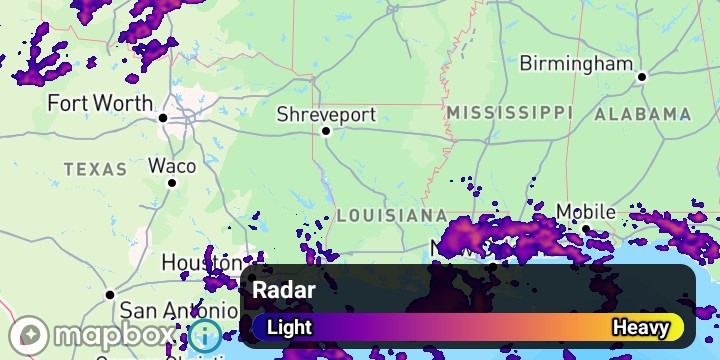
Changing the scale
Set the scale on the built-in configuration before the layer is added, or call MapController.setPaintProperty once it is on the map. setPaintProperty rebuilds the color lookup tables and updates the legend. The property path matches the JS example’s sample.colorscale:
val config = WeatherService.Radar(controller.service)
val paint = (config.layer.paint as SampleLayerPaint).sample
paint.colorScale = perTypeScale()

val layer = controller.addWeatherLayer(config) ?: return

controller.setPaintProperty(layer.id, "sample.colorscale", singleScale())
sample.colorScale is also accepted. The value is a ColorScaleOptions.
Per-precipitation-type scales: nested stop lists
The JS example passes three masks and relies on array order:
masks: [ { colorscale: rain }, { colorscale: mix }, { colorscale: snow } ]Nest one stop list per type inside stops:
ColorScaleOptions(
    stops = listOf(
        ColorScales.radarRain.stops,
        ColorScales.radarMix.stops,
        ColorScales.radarSnow.stops,
    ),
)
ColorScaleOptions.stops accepts a flat list of ColorStop or a nested list with one band per precipitation type. Nested stops are read in rain, mix, snow order.
normalized stays false here, because the stop values are real dBZ numbers.
Color strings
ColorStop accepts a Color or a color string. Strings use Android’s #RRGGBB and #AARRGGBB form, so the JS 'rgba(0,0,0,0)' is "#00000000". Alpha leads.
private val CLEAR = listOf(
    ColorStop(0.0, "#00000000"),
    ColorStop(5.9, "#00000000"),
)

val CUSTOM_RAIN = CLEAR + listOf(
    ColorStop(6.0, "#588d45"),
    ColorStop(40.0, "#a1943a"),
    ColorStop(70.0, "#fa0000"),
)
That transparent lead-in is not decoration: without it the lowest color in the scale floods the map everywhere there is no precipitation. The JS example does the same thing by passing ['rgba(0,0,0,0)'] as the prefix argument to getColorScale.
Palettes
ColorScales provides the built-in weather ramps, including radarRain, radarMix, and radarSnow. A generic palette such as viridis or plasma is a list of 0..1 control points in your own code. Map those positions onto the radar dBZ range so the fill and the legend share the same stops:
// The numbers LegendCode.RADAR's own bars use, so the palette covers exactly what the legend draws.
private const val DBZ_MIN = 6.0
private const val DBZ_MAX = 87.0

private fun paletteOverDbz(palette: List<Pair<Double, String>>): List<ColorStop> =
    CLEAR + palette.map { (position, hex) ->
        ColorStop(DBZ_MIN + position * (DBZ_MAX - DBZ_MIN), hex)
    }
Use dBZ stops for radar. normalized = true is for data that is already in the 0..1 range, such as the wind-particles scale.
One legend bar for a single scale
LegendCode.RADAR is three bars — rain, mix, and snow. A single scale for every precipitation type belongs on one bar. After setPaintProperty, fold the template down to that bar and drop the type word from its labels. The legend title already says Radar.
Register the legend control before adding the layer, so it is there when the layer creates its legend. See Using legends.
@Suppress("UNCHECKED_CAST")
private fun combineLegendBarsIfOneScale() {
    if (SCALE_NAMES[scaleIndex] in PER_TYPE_SCALES) return
    val legend = legendControl.getLegend(LEGEND_ID) as? BarLegend<Dimension> ?: return
    val bar = legend.items.firstOrNull() ?: return
    val combined = bar.copy(
        labels = bar.labels.copy(
            values = BarLegendLabels.Values.FromLabels<Dimension> {
                listOf(0.0 to "Light", 1.0 to "Heavy")
            },
        ),
    )
    legendControl.update(legend.copy(items = listOf(combined)))
}
Call this after the layer is added, which is when the legend exists. A later setPaintProperty with per-type stops writes those stops back into the configuration’s three bars.
LEGEND_ID is LegendCode.RADAR.id. Dimension is com.xweather.mapsgl.extensions.Dimension.
Related
- Customizing temperature colors — the same sample-layer color scale, with
intervalbanding - Customizing the heat index legend — changing what a bar legend says about a scale
- Customizing alert polygon styles — paint overrides on a vector layer