MapsGL Android - Customizing the heat index legend
This example updates the heat index legend after 5 seconds to display custom labels based on a normalized range of heat index values (from 0 to 1).
It is the Android port of the MapsGL JS Customizing the heat index legend example. The complete activity ships in the MapsGL Android SDK demo as CustomHeatIndexLegendActivity.
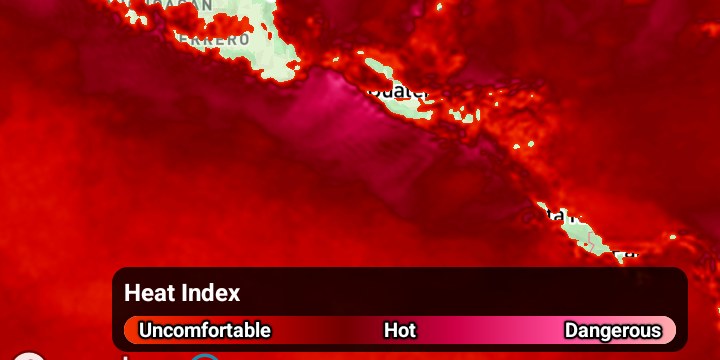
Adding the legend control
The JS example passes a CSS selector and the SDK builds the control into that element:
controller.addLegendControl('#legend');On Android you own the LegendControl, hand it to the controller, and place its view yourself.
That is more code, but it means the legend is an ordinary Android view you can constrain wherever
you want:
private val legendControl = LegendControl()

controller.add(legendControl)
legendControl.setDarkTheme(true)

val legendView = legendControl.getView()
legendView.id = View.generateViewId()
binding.customHeatIndexLegendRoot.addView(legendView)
(legendView.layoutParams as ConstraintLayout.LayoutParams).apply {
    endToEnd = ConstraintLayout.LayoutParams.PARENT_ID
    bottomToBottom = ConstraintLayout.LayoutParams.PARENT_ID
    bottomMargin = dp(24)
    marginEnd = dp(16)
    width = dp(300)
}
Getting the legend for a layer
JS reaches it through the controller’s control registry:
const legend = controller.controls.legend.getLegend('heat-index');Android’s LegendControl.getLegend(id) takes the same id string:
val legend = legendControl.getLegend("heat-index")That id is LegendCode.HEAT_INDEX.id, the same "heat-index" value the JS SDK uses.
A legend is only registered once its layer has been added, so look it up after
addWeatherLayer — this example does it on a five-second delay, which is late enough either way.
Replacing the labels
JS applies a partial update describing just the labels:
legend.update({
    bar: {
        labels: {
            normalized: true,
            values: [
                { value: 0,   label: 'Uncomfortable' },
                { value: 0.5, label: 'Hot' },
                { value: 1,   label: 'Dangerous' }
            ],
            marks: 'none'
        }
    }
});
Android has no partial-update dictionary. The equivalent is to set values on the bar’s
BarLegendLabels to a Values.FromLabels — the variant whose accessor returns (position, label)
pairs, the direct counterpart of the JS values array — and then hand the legend back to
LegendControl.update:
val legend = legendControl.getLegend("heat-index") as? BarLegend<UnitTemperature> ?: return

legend.items.forEach { item ->
    item.labels.values = BarLegendLabels.Values.FromLabels {
        listOf(
            0.0 to "Uncomfortable",
            0.5 to "Hot",
            1.0 to "Dangerous",
        )
    }
    item.labels.normalized = true
}

legendControl.update(legend)
getLegend returns the Legend interface, so the cast to BarLegend<UnitTemperature> is what
gives access to items. Heat index is a temperature-measurement bar legend; a different product
would use its own unit type.
items, labels, values, and normalized are all var. Mutate them in place and call update.
Two Android specifics
FromLabels positions are always bar fractions. The renderer takes the first element of each
pair as a 0..1 position across the bar and uses it directly, so this variant pairs with
normalized = true and values in that range. Raw data values — 90, 100, 110 — belong in
Values.FromValues, which converts them through the colour ramp. Passing degrees to FromLabels
puts every label at the same end of the bar.
marks: 'none' has no counterpart, and needs none. The Android bar legend draws the colour
ramp and the label text and nothing else — there are no tick marks to switch off — so the JS
example’s third setting is already the Android default.
The default it replaces
For reference, the built-in heat-index legend labels every 10°F through Values.Every:
| labels | |
|---|---|
| default | 90°F 100 110 120 |
| after the update | Uncomfortable Hot Dangerous |
so this example is really a switch from an interval-generated scale to three fixed, qualitative
stops — which is why normalized matters: the positions no longer mean degrees.
Related
- Change map units — the other legend example in this app, which relabels the same kind of bar by changing units instead of labels