MapsGL Android - Customizing alert polygon styles
This example customizes the alert colors of the alerts weather layer by adjusting the color of the alert polygons based on the severity of each alert. This is useful when you want to highlight warnings against watches, advisories and statements, rather than showing the per-product colors the tiles ship with.
It is the Android port of the MapsGL JS Customizing alert polygon styles example. The complete activity ships in the MapsGL Android SDK demo as CustomAlertStylesActivity.
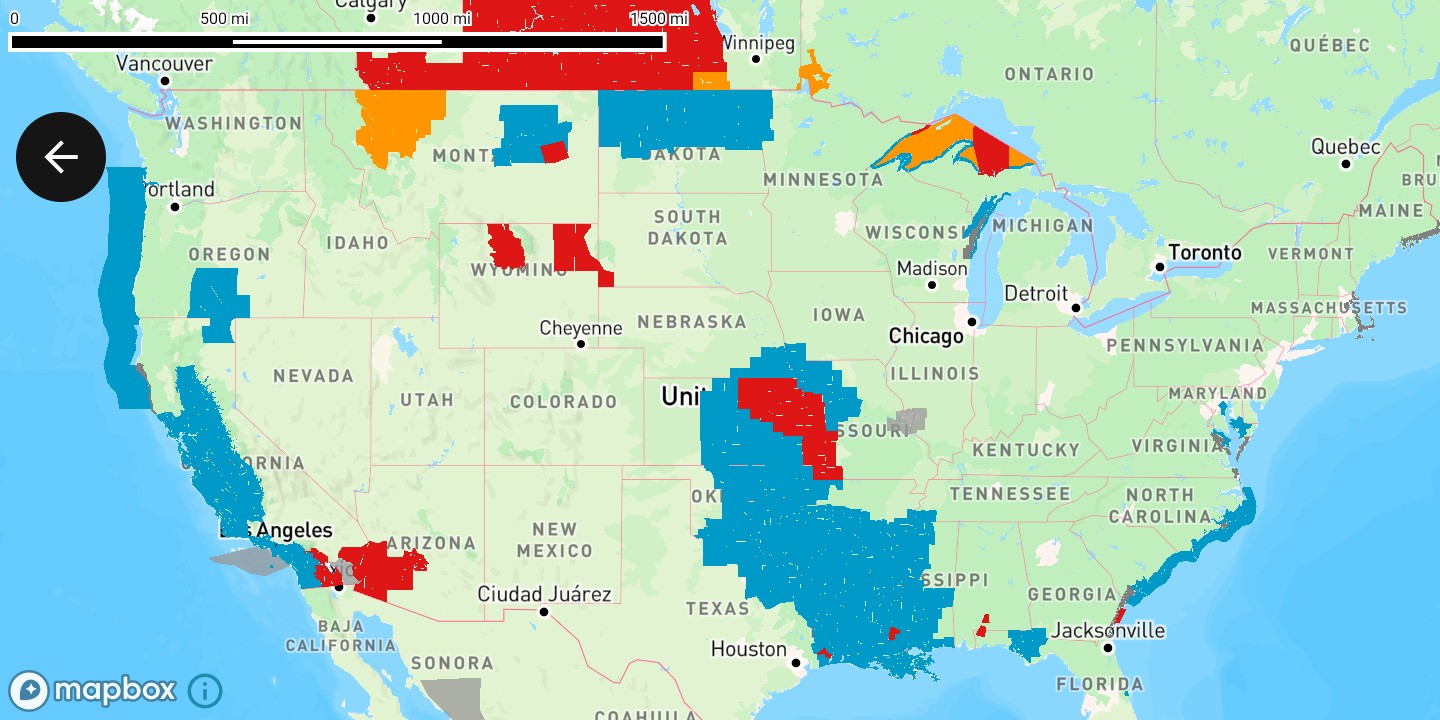
Deriving the severity
Severity comes from VTEC, the NWS product code. The character after the dot is the significance: W warning, A watch, Y advisory, S statement. “SEVERE THUNDERSTORM WARNING” is SV.W, “GALE WATCH” is GL.A, and “HEAT ADVISORY” is HT.Y.
import com.xweather.mapsgl.style.Expression

private val ALERT_COLOR: Expression = Expression.match(
    Expression.slice(Expression.get("VTEC"), 3),
    listOf(
        Expression.Step("W", "#df1616"), // warning
        Expression.Step("A", "#ff9600"), // watch
        Expression.Step("Y", "#009ac8"), // advisory
        Expression.Step("S", "#808080"), // statement
    ),
    // Products issued without a VTEC code — an air quality alert, for one — fall through to the
    // tile's own COLOR, which arrives without a leading "#". This is the same fallback the
    // built-in alerts layer uses, and mirrors the JS example's coalesce(get('COLOR'), '#000').
    Expression.concat(listOf("#", Expression.get("COLOR"))),
)
Applying it to the layer
Take the built-in alerts configuration, override the fill and stroke colors, and add that instead of the plain LayerCode.
import com.xweather.mapsgl.style.FillLayerPaint
import com.xweather.mapsgl.style.StyleValue
import com.xweather.mapsgl.weather.WeatherLayerConfiguration
import com.xweather.mapsgl.weather.WeatherService

val config = WeatherService.Alerts(controller.service) as WeatherLayerConfiguration<*, *>
val paint = config.layer.paint as FillLayerPaint

paint.fill?.color = StyleValue.Expression(ALERT_COLOR)
paint.fill?.opacity = StyleValue.Constant(0.5)
paint.stroke?.color = StyleValue.Expression(ALERT_COLOR)
paint.stroke?.opacity = StyleValue.Constant(1.0)

controller.addWeatherLayer(config)
Overriding paint on a WeatherLayerConfiguration is the same pattern as any other weather-layer customization.
Complete example
private fun alertsWithSeverityColors(): WeatherLayerConfiguration<*, *> {
    val config = WeatherService.Alerts(controller.service) as WeatherLayerConfiguration<*, *>
    val paint = config.layer.paint as FillLayerPaint

    paint.fill?.color = StyleValue.Expression(ALERT_COLOR)
    paint.fill?.opacity = StyleValue.Constant(0.5)
    paint.stroke?.color = StyleValue.Expression(ALERT_COLOR)
    paint.stroke?.opacity = StyleValue.Constant(1.0)

    return config
}

// …in subscribeMapLoaded, after setting the camera:
controller.addWeatherLayer(alertsWithSeverityColors())
The camera matches the JS example’s center: [-96.33207, 40.60621], zoom: 3 — on Android that is Coordinate(40.60621, -96.33207), since Coordinate takes latitude first.
Related
- Weather layers — overriding paint on built-in layer configurations
- Expressions — the supported data-driven style expressions
- Custom map layers — all supported layer descriptors