MapsGL Android - Customizing lightning point styles
This example customizes the circle styles of the lightning-strikes weather layer by adjusting the circle fill color and opacity based on the age of each strike.
It is the Android port of the MapsGL JS Customizing lightning point styles example. The complete activity ships in the MapsGL Android SDK demo as CustomLightningStylesActivity.
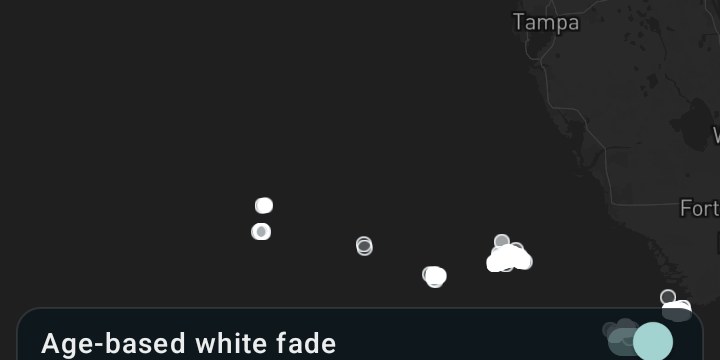
Overriding paint on a built-in configuration
WeatherService.LightningStrikes returns the same configuration addWeatherLayer would build from
LayerCode.LIGHTNING_STRIKES. Mutate its paint before adding it and the layer arrives styled —
the Android counterpart of the JS options argument:
val lightning = WeatherService.LightningStrikes(controller.service)
val paint = lightning.layer.paint          // CircleLayerPaint

// …style it…

controller.addWeatherLayer(lightning)
Unlike the alerts example, CircleLayerPaint.fill, .stroke and .circle are non-null, so there
is no ?. dance:
paint.stroke.color = StyleValue.Constant(Color.White)   // JS stroke.color '#fff'
paint.stroke.thickness = StyleValue.Constant(1.0)       // JS stroke.thickness 1
paint.circle.radius = StyleValue.Constant(4.0)          // JS circle.radius 4
Color here is androidx.compose.ui.graphics.Color. The SDK’s own toColor string helper is
internal, so from app code either use a Color constant, or put a colour string inside an
expression, which is what the fill does below.
Fade with the color’s alpha
Circle fill.opacity is a constant. Per-strike fade goes in the fill color. The JS example multiplies a color alpha by a separate opacity step; those products are the alphas below.
| age (s) | alpha |
|---|---|
| 0–60 | 1.00 |
| 61–300 | 0.56 |
| 301–600 | 0.30 |
| 601+ | 0.12 |
paint.fill.color = StyleValue.Expression(
    Expression.step(
        Expression.coalesce(listOf(Expression.get("age"), 0.0)),
        listOf(
            Expression.Step(null, "rgba(255, 255, 255, 1)"),
            Expression.Step(61.0, "rgba(255, 255, 255, 0.56)"),
            Expression.Step(301.0, "rgba(255, 255, 255, 0.30)"),
            Expression.Step(601.0, "rgba(255, 255, 255, 0.12)"),
        ),
    ),
)
step wants the base output first
Expression.step takes Expression.Step objects, and the first one is the output used below
the first real threshold — its value is ignored, so pass null:
Expression.Step(null, "rgba(255, 255, 255, 1)")   // base case
Expression.Step(61.0, "…")                        // first real threshold
That mirrors the JS form, where the output immediately after the input is the base case.
coalesce guards strikes that arrive without an age, so they use the base color.
The basemap
The JS example loads dark-v9. White circles on the default light style would be invisible, so
this screen loads Style.DARK and adds the layer in the load callback — replacing a style discards
a layer added before it:
controller.mapView.mapboxMap.loadStyle(Style.DARK) { addStrikes() }Related
- Custom lightning symbols using a shader — the same layer and the
same
ageproperty, but drawn procedurally by a fragment shader instead of as circles - Customizing alert polygon styles — the same paint-override pattern on a fill layer