MapsGL Android - Custom lightning symbols using a shader
This example customizes the appearance of lightning symbols with a custom fragment shader on IconPaint.shader. Each strike draws procedurally — there is no sprite — and a noise function gates when it flashes, animated and varying with the age of the strike.
It is the Android port of the MapsGL JS Custom lightning symbols using a shader example. The complete activity ships in the MapsGL Android SDK demo as CustomLightningShaderActivity.
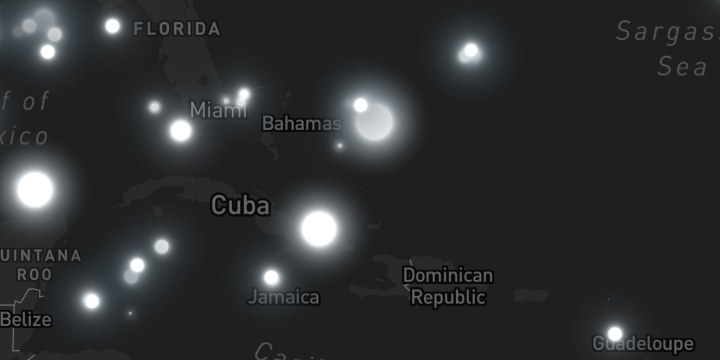
Age drives everything
The only paint expression is the factor, straight from the JS example:
// JS: factor: ['/', ['-', 200, ['get', 'age']], 200]
paint.icon.factor = StyleValue.Expression(
    Expression.divide(
        Expression.subtract(200.0, Expression.get("age")),
        200.0,
    ),
)
A fresh strike is near 1.0; a 200-second-old one reaches 0.0. Inside the shader v_factor
appears four times — flash duration, flash frequency, flash intensity, and overall alpha — so a
recent strike flashes often and brightly while an old one barely registers. That single expression
is what makes the layer feel alive, and the demo screen has a toggle that pins it high so you can
see what it is doing.
age is a real property on these features: the built-in LightningStrikes product colours its
circles with Expression.step(Expression.get("age"), …), so the same value is available here.
Size is a plain constant
The JS size: { width: 60, height: 60 } is constant and square, so iconSize carries it directly
— no need for the per-axis iconWidth / iconHeight that the
fires example requires:
paint.icon.iconSize = IconSize(60f, 60f)The basemap is not decoration
The JS example loads dark-v9. That matters: the flash colour is vec4(235, 241, 245, 255) / 255
— very nearly white — so on the default light style there is almost nothing to see.
Loading a style replaces it wholesale, which discards a custom layer added beforehand, so add the layer inside the load callback:
controller.mapView.mapboxMap.loadStyle(Style.DARK) {
    controller.addWeatherLayer(config)
}
Straight alpha
Symbol layers composite with straight alpha. Write fragColor with that alpha and leave out gl_FragColor.rgb *= gl_FragColor.a. Where two flashes overlap, the nearer fragment is the one that shows.
The flash uses rand, noise, and FLASH_POWER.
Watch the layer id
WeatherService.LightningStrikes pairs this source with a circle layer, and
WeatherService.LightningStrikesIcons gives its symbols a sprite — which would turn v_tex into
atlas coordinates and break the distance maths. This layer uses its own id and sets no icon image:
override val layer: SymbolLayerDescriptor = SymbolLayerDescriptor(
    id = "severe.lightning.flash",
    source = source.id,
    paint = SymbolLayerPaint(icon = IconPaint(), text = emptyList()),
)
The ported shader
#version 310 es
precision highp float;

uniform float u_time;

in vec2  v_tex;
in vec4  v_color;
in float v_factor;

out vec4 fragColor;

float rand(float x) {
    return fract(sin(x) * 75154.32912);
}

float noise(float x) {
    float i = floor(x);
    float a = rand(i), b = rand(i + 1.0);
    float f = x - i;
    return mix(a, b, f);
}

#define COL1 vec4(0, 0, 0, 0) / 255.0
#define COL2 vec4(235, 241, 245, 255) / 255.0
#define FLASH_POWER 0.8

void main() {
    // Radially symmetric about the quad centre, so v_tex needs no Y flip here.
    vec2 pos = v_tex;

    float dist = length(2.0 * pos - 1.0) * 2.0;
    float x = u_time + 0.1;

    float m = 0.2 + 0.2 * v_factor;        // max duration of strike
    float i = floor(x / m);
    float f = x / m - i;
    float k = v_factor;                    // frequency of strikes
    float n = noise(i);
    float t = ceil(n - k);                 // occurrence
    float d = max(0.0, n - k) / (1.0 - k); // duration
    float o = ceil(t - f - (1.0 - d));     // occurrence with duration

    float fx = 4.0;
    if (o == 1.0) {
        fx += 10.0 * v_factor;
    }

    fx = max(4.0, fx);
    float g = fx / (dist * (10.0 + 20.0)) * FLASH_POWER;

    // smooth out edges to avoid fading extending beyond the symbol's bounds
    float edgeFadeFactor = smoothstep(0.5, 1.0, dist);
    float invertedEdgeFadeFactor = 1.0 - edgeFadeFactor;

    vec4 color = mix(COL1, COL2, g);
    color.a *= min(1.0, 0.5 + v_factor) * invertedEdgeFadeFactor;

    // v_color.a carries the collision fade. No premultiply: this renderer blends
    // GL_SRC_ALPHA, GL_ONE_MINUS_SRC_ALPHA.
    fragColor = vec4(color.rgb, clamp(color.a, 0.0, 1.0) * v_color.a);
    if (fragColor.a < 0.01) discard;
}
Related
- Custom earthquake symbols using a shader — the shader interface and the icon-less path, in full
- Custom fire symbols using a shader —
#include <fbm>,v_random, and per-axis sizing