MapsGL Android - Filter weather alerts by category
This example filters the data shown by the alerts weather layer by alert category. A category is a set of VTEC codes, and the filter keeps only the features whose VTEC property is in that set. The codes are listed under Alert types.
A drop-down switches category at runtime, and the screen turns on the data inspector, so tapping a polygon names the alert it kept.
It is the Android port of the MapsGL JS Filter weather alerts by category example. The complete activity ships in the MapsGL Android SDK demo as FilterAlertsActivity.
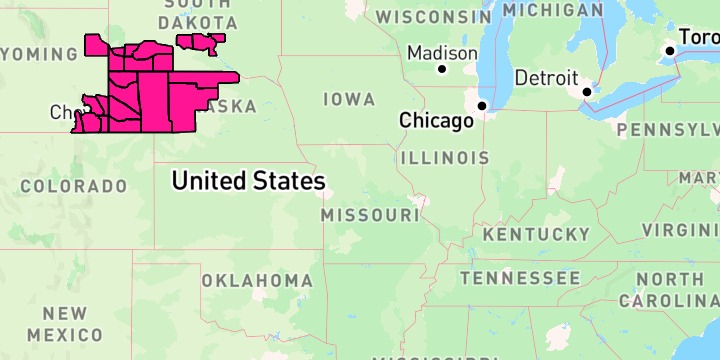
Filter with Expression.contains
The filter keeps features whose VTEC property is in the category’s code list:
Expression.contains(Expression.get("VTEC"), listOf("SV.W", "TO.W", /* … */))“All” is no filter at all
Pass null to draw every feature again:
controller.setLayerFilter(
    layerId,
    category.codes?.let { Expression.contains(Expression.get("VTEC"), it) },
)
The data inspector confirms the filter
The screen turns on the SDK’s data inspector, which is a single call:
controller.addDataInspectorControl(mapView)Tapping a polygon names the alert, which is how you check the filter did what you meant — every feature left on the map should belong to the chosen category. In the screenshot above the remaining polygons report Red Flag Warning, which is a Fire code, and the severe and coastal groups that were there unfiltered are gone.
Changing the filter on a live layer
MapController.setLayerFilter is the counterpart of the JS example’s alertsLayer.setFilter(…), and the category picker calls it:
controller.setLayerFilter(layerId, filterFor(category))Setting the filter on the descriptor before addWeatherLayer still works, and is what the example does for its opening category:
val config = WeatherService.Alerts(controller.service)
config.layer.filter = Expression.contains(Expression.get("VTEC"), fireCodes)
controller.addWeatherLayer(config)
Change a filter on a layer that is already on the map with setLayerFilter. That rebuilds the geometry for the new filter.
Related
- Customizing alert polygon styles — the same layer, styled by severity rather than filtered, and the other place
VTECis read