MapsGL Android - Custom earthquake symbols using a shader
This example customizes the symbols displayed by the earthquakes weather layer using a custom fragment shader. Each quake is drawn procedurally — there is no sprite involved at all — and the shader turns the symbol’s quad into concentric waves that travel outward over time, sized by the quake’s magnitude.
Custom shaders can be used for symbol layer types to create a unique animated visual effect for each symbol based on the feature’s data and properties.
It is the Android port of the MapsGL JS Custom earthquake symbols using a shader example. The complete activity ships in the MapsGL Android SDK demo as CustomEarthquakeShaderActivity.
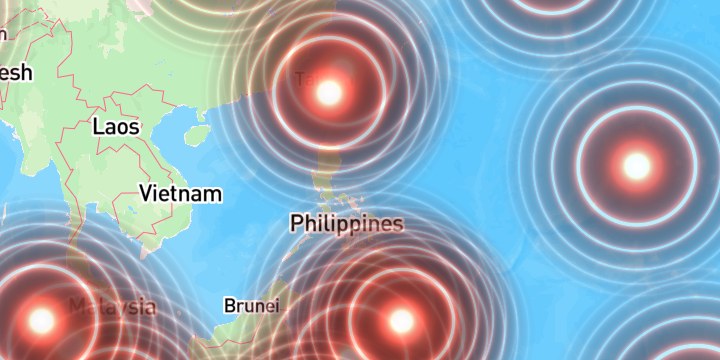
Drawing with no icon image
IconPaint.shader normally recolors a sprite. Set it with no IconPaint.source and the renderer takes its icon-less path instead: it still lays the quad out from IconPaint.size / IconPaint.iconSize, but hands the fragment stage a clean 0..1 quad coordinate in v_tex rather than an atlas rectangle.
v_tex is then the JS example’s vUv: a 0..1 coordinate across the quad. Leave IconPaint.source unset. With an icon image set, v_tex is an atlas coordinate instead.
Shader language version
The symbol vertex shader is #version 310 es and is compiled with your fragment shader as written. Declare the same version so the program links on OpenGL ES 3.1 and newer:
#version 310 es
precision highp float;
The shader interface
The symbol vertex stage hands your fragment shader this interface, in GLSL ES 3.x rather than the WebGL1 GLSL ES 1.00 the web SDK uses.
#version 310 es
precision highp float;                  // required - the vertex stage uses highp
uniform sampler2D u_sdfTex;             // glyph / SDF atlas
uniform sampler2D u_rasterTex;          // sprite atlas
uniform vec4  u_haloColor;
uniform float u_haloWidth;
uniform int   u_raster_mode;            // != 0 for sprite icons, 0 for SDF
uniform float u_time;                   // seconds since process start
in vec2  v_tex;                         // 0..1 across the quad when no icon image is set
in vec4  v_color;                       // .a carries the collision fade - always respect it
in float v_factor;                      // per-feature IconPaint.factor, default 1.0
in float v_random;                      // stable per-instance random, for de-syncing effects
out vec4 fragColor;Porting the web shader
Translating the JS example’s shader needs five changes and nothing else.
JS (paint.symbol.shader) | Android (IconPaint.shader) |
|---|---|
varying vec2 vUv | in vec2 v_tex (0..1 only with no icon image) |
varying float vFactor | in float v_factor, from IconPaint.factor |
varying float vRandom | in float v_random |
uniform float time | uniform float u_time |
gl_FragColor = … | out vec4 fragColor |
precision mediump float | precision highp float (the vertex stage uses highp) |
Two web-only details are dropped rather than translated:
#extension GL_OES_standard_derivatives—fwidthis core in ES 3.x, so requesting the extension is a compile error rather than a harmless no-op.gl_FragColor.rgb *= gl_FragColor.a— symbol layers blend straight alpha. Leave this line out so the color is not darkened.
The JS resolution and dpr uniforms have no Android counterpart. This effect never reads them, so nothing is lost; an effect that needs pixel size should derive it from the quad instead.
One deliberate change to the wave math: the JS example’s alpha is 1.0 - d, which goes negative outside the quad’s inscribed circle. A negative alpha reaching GL_ONE_MINUS_SRC_ALPHA brightens the basemap in the quad’s corners instead of leaving it alone, so the port clamps with max(0.0, 1.0 - d) and discards near-zero fragments.
#version 310 es
precision highp float;

uniform sampler2D u_sdfTex;
uniform sampler2D u_rasterTex;
uniform vec4  u_haloColor;
uniform float u_haloWidth;
uniform int   u_raster_mode;
uniform float u_time;

in vec2  v_tex;
in vec4  v_color;
in float v_factor;

out vec4 fragColor;

vec3 hsb2rgb(in vec3 c) {
    vec3 rgb = clamp(abs(mod(c.x * 6.0 + vec3(0.0, 4.0, 2.0), 6.0) - 3.0) - 1.0, 0.0, 1.0);
    rgb = rgb * rgb * (3.0 - 2.0 * rgb);
    return c.z * mix(vec3(1.0), rgb, c.y);
}

void main() {
    // With no icon image bound, v_tex is the quad's own 0..1 coordinate - the JS example's vUv.
    vec2 pos = v_tex;
    float t = u_time;

    float dist = length(2.0 * pos - 1.0) * 2.0;
    vec2 p = vec2(dist);

    float r = length(p) * 0.9;
    vec3 color = hsb2rgb(vec3(0.03, 0.7, 0.6));

    float a = pow(r, 3.0);
    float b = sin(r * 1.8 - 1.6);
    float c = sin(r - 0.010);
    float s = sin(a - t * 2.0 + b) * c;

    color *= abs(1.0 / (s * 1.8)) - 0.01;

    // Fade to nothing at the quad's inscribed circle; max() keeps alpha out of negatives.
    float d = length(2.0 * pos - 1.0);
    float alpha = max(0.0, 1.0 - d);

    // v_color.a carries the collision fade. No premultiply: this renderer does not blend
    // premultiplied.
    fragColor = vec4(color, alpha * v_color.a);
    if (fragColor.a < 0.01) discard;
}
The wave math is unchanged from the JS example, which itself adapts Shadertoy ldycR3 . Only the shader interface moved.
Keeping the effect animating
animated: true in the JS paint has no direct Android equivalent, and a shader that samples u_time does not by itself keep the map painting: once the camera settles and the timeline is paused, Mapbox stops calling the renderer and the ripples freeze.
The renderer treats a symbol layer as continuously animated when IconPaint.spin is set, so this example sets spin with spinDegreesPerSecond at 0. Frames keep arriving and u_time keeps advancing, while the vertex stage’s rotation term stays zero.
paint.icon.spin = true
paint.icon.spinDegreesPerSecond = 0fSizing from magnitude
The JS example sets size: { width: s, height: s } where s = 20 + 100 * (report.mag / 10), in JS icon pixels.
Android splits that into two properties: IconPaint.iconSize is the pixel box but takes constants only, while IconPaint.size is a multiplier and accepts an expression. Dividing the JS pixel expression by IconSize.JS_REFERENCE_WIDTH_PX — 40, the width Android measures multipliers against — converts one into the other and lands on the same pixel size per feature.
import com.xweather.mapsgl.style.Expression
import com.xweather.mapsgl.style.StyleValue

// JS: ['+', 20, ['*', 100, ['/', ['coalesce', ['get', 'report.mag'], 1], 10]]]
private val MAGNITUDE_SIZE_SCALE: Expression = Expression.divide(
    Expression.add(
        20.0,
        Expression.multiply(
            100.0,
            Expression.divide(
                Expression.coalesce(listOf(Expression.get("report.mag"), 1.0)),
                10.0,
            ),
        ),
    ),
    40.0,
)

paint.icon.size = StyleValue.Expression(MAGNITUDE_SIZE_SCALE)
coalesce covers quakes that report no magnitude, which would otherwise size to nothing.
Attaching a symbol layer to the earthquakes source
WeatherService.Earthquakes pairs the earthquakes GeoJSON with a circle layer, matching the default product, so it cannot carry an icon shader. The JS example sidesteps this with type: 'symbol', source: 'earthquakes'; on Android the equivalent is to reuse WeatherSource.earthquakes under your own SymbolLayerDescriptor, which keeps the same data and the same report.* feature properties.
import com.xweather.mapsgl.controls.legend.Legend
import com.xweather.mapsgl.layers.spec.SymbolLayerDescriptor
import com.xweather.mapsgl.sources.source.spec.GeoJSONSourceDescriptor
import com.xweather.mapsgl.style.IconPaint
import com.xweather.mapsgl.style.SymbolLayerPaint
import com.xweather.mapsgl.weather.LayerCode
import com.xweather.mapsgl.weather.WeatherLayerConfiguration
import com.xweather.mapsgl.weather.WeatherService
import com.xweather.mapsgl.weather.WeatherSource
import com.xweather.mapsgl.weather.common.Presentation

private class EarthquakeRippleConfiguration(
    service: WeatherService,
) : WeatherLayerConfiguration<GeoJSONSourceDescriptor, SymbolLayerDescriptor> {
    override val code: LayerCode = LayerCode.EARTHQUAKES
    override val source: GeoJSONSourceDescriptor = WeatherSource.earthquakes(service)
    override val layer: SymbolLayerDescriptor = SymbolLayerDescriptor(
        id = "climate.earthquakes.ripple",
        source = source.id,
        paint = SymbolLayerPaint(icon = IconPaint(), text = emptyList()),
    )
    override var presentation: Presentation? = null
    override var legend: Legend? = null
}
Complete example
override fun customizeLayers(controller: MapboxMapController) {
    val config = EarthquakeRippleConfiguration(controller.service)
    val paint = config.layer.paint

    paint.icon.shader = RIPPLE_SHADER
    paint.pitchWithMap = true                       // JS parity; also the Android default
    paint.icon.size = StyleValue.Expression(MAGNITUDE_SIZE_SCALE)

    // Keeps frames coming so u_time advances; the rotation term stays at zero.
    paint.icon.spin = true
    paint.icon.spinDegreesPerSecond = 0f

    controller.addWeatherLayer(config)
}
The camera matches the JS example’s center: [124.091, 26.232], zoom: 2 — on Android that is Coordinate(26.232, 124.091), since Coordinate takes latitude first.
Changing icon paint after the layer is on the map needs MapController.refreshGlVectorLayerPaint. Setting it before addWeatherLayer, as above, needs no refresh.
Reusable shader chunks
Custom symbol shaders support the same #include <name> chunk mechanism as the web SDK, so effects that need noise do not have to re-type it:
#include <fbm>fbm is value-noise fractal Brownian motion, the same chunk the fire example uses. An unknown name is left as a GLSL comment, so the compile error points at the #include.
Related
- Custom map layers — all supported layer descriptors
- Data-driven styling — driving paint from feature properties
- Expressions — the supported data-driven style expressions
- Weather layers — overriding paint on built-in layer configurations