MapsGL Android - Change map units
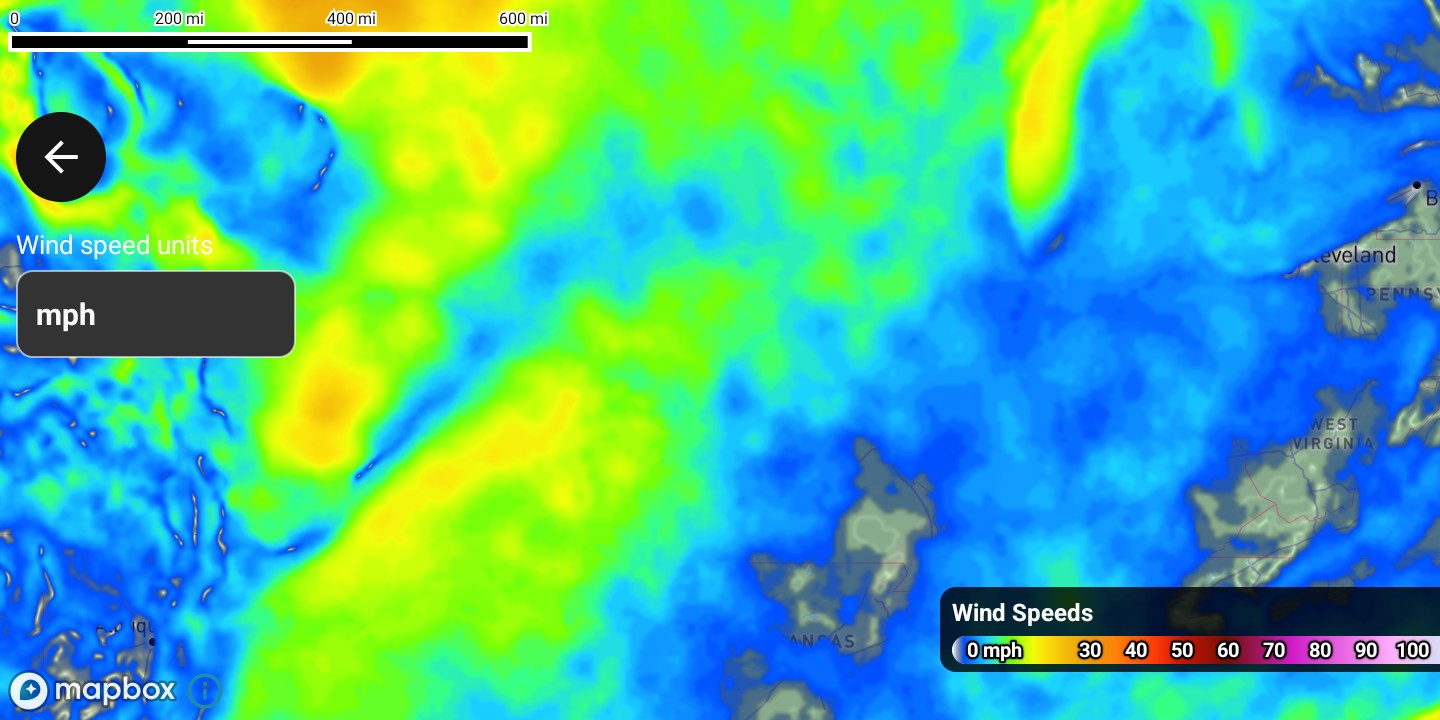
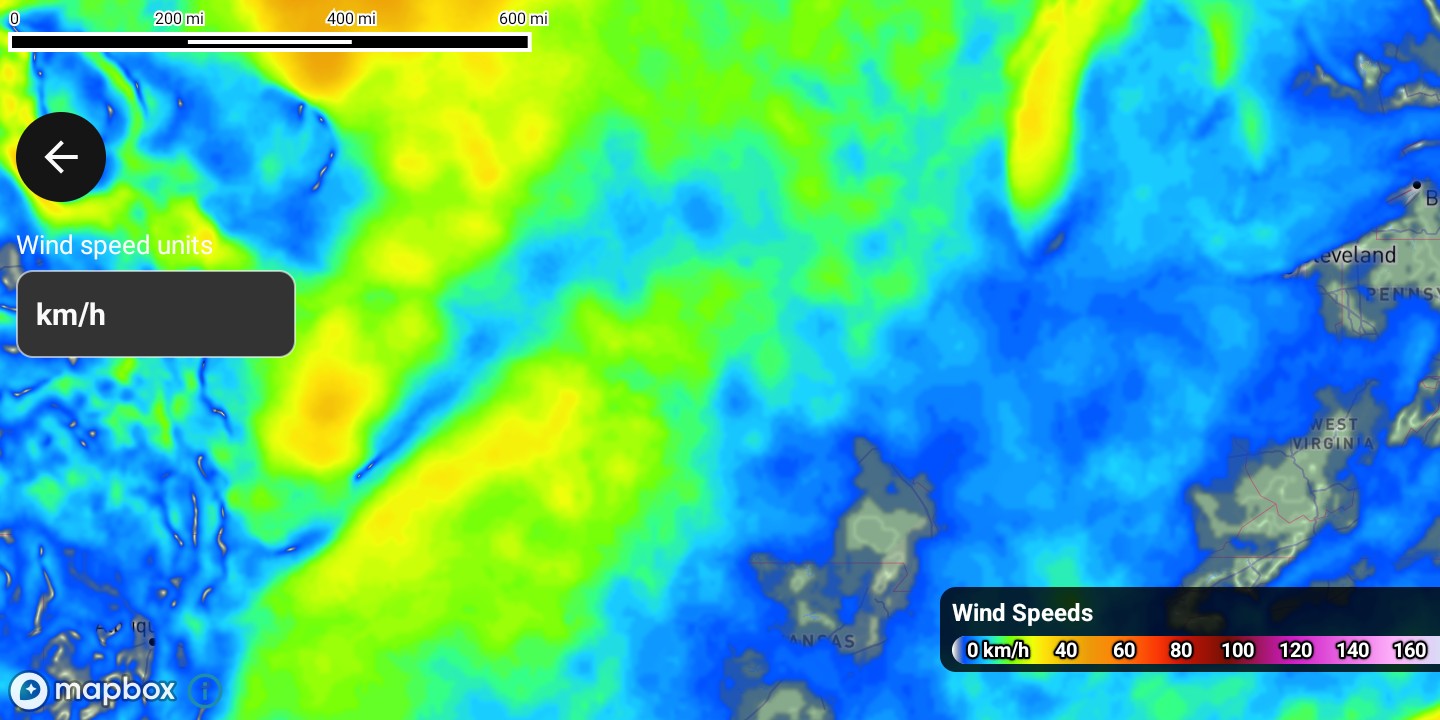
This example shows wind speeds with a legend and a selector that switches the speed unit between km/h, mph, and m/s at runtime. The legend relabels itself to match; the underlying data is unchanged, so only the formatting moves.
It is the Android port of the MapsGL JS Change map units example. The complete activity ships in the MapsGL Android SDK demo as ChangeMapUnitsActivity.
The same wind-speed data, before and after switching the selector. Only the formatting changes — the legend relabels itself and rescales its ticks, while the layer underneath is untouched.
Set up the map
Create a MapboxMapController, position the camera, and wait for the map to load before adding the legend and weather layer.
import com.mapbox.maps.MapboxMap
import com.xweather.mapsgl.config.weather.account.XweatherAccount
import com.xweather.mapsgl.map.mapbox.MapboxMapController
import com.xweather.mapsgl.types.Coordinate
import com.xweather.mapsgl.weather.LayerCode

val xweatherAccount = XweatherAccount(
    getString(R.string.xweather_client_id),
    getString(R.string.xweather_client_secret),
)

val controller = MapboxMapController(mapView, xweatherAccount)
val mapboxMap = controller.mapboxMap ?: return

// Matches the JS example's `center: [-93, 40], zoom: 4`. Coordinate is (lat, lon).
controller.setCenter(Coordinate(40.0, -93.0))
controller.setZoom(4.0)

val mapLoadedCancelable = mapboxMap.subscribeMapLoaded {
    attachLegend()

    // Seed the controller from the selector so the two agree before the first draw.
    applySpeedUnit(speedUnitIndex)

    controller.addWeatherLayer(LayerCode.WIND_SPEEDS)
}
Change the units
Assign a modified copy of the controller’s current MeasurementUnits. Only the category you name changes; every other unit keeps its current value.
import com.xweather.mapsgl.extensions.UnitSpeed

// The Android equivalent of `controller.setUnits({ speed: … })`.
controller.units = controller.units.copy(speed = UnitSpeed.kilometersPerHour)
UnitSpeed supplies kilometersPerHour, milesPerHour, and metersPerSecond, matching the three options in the JS example’s <select>. Wire them to whatever control you like — the demo uses a Spinner:
private fun applySpeedUnit(index: Int) {
    val unit = when (index) {
        0 -> UnitSpeed.kilometersPerHour
        2 -> UnitSpeed.metersPerSecond
        else -> UnitSpeed.milesPerHour
    }
    controller.units = controller.units.copy(speed = unit)
}
MeasurementUnits also ships IMPERIAL and METRIC presets if you want to switch every category at once rather than one field.
Add the legend
The JS example’s addLegendControl('#legend') becomes a LegendControl added to the controller, whose view you then position in your own layout. The legend picks up unit changes on its own — no extra call is needed when controller.units changes.
import android.view.View
import androidx.constraintlayout.widget.ConstraintLayout
import com.xweather.mapsgl.controls.legend.LegendControl

private val legendControl = LegendControl()

private fun attachLegend() {
    controller.add(legendControl)
    legendControl.setDarkTheme(true)

    val legendView = legendControl.getView()
    legendView.id = View.generateViewId()
    binding.changeMapUnitsRoot.addView(legendView, 1)

    val params = legendView.layoutParams as ConstraintLayout.LayoutParams
    val parentId = ConstraintLayout.LayoutParams.PARENT_ID
    params.endToEnd = parentId
    params.bottomToBottom = parentId
    params.bottomMargin = dp(24)
    params.marginEnd = dp(16)
    params.width = dp(300)
    legendView.layoutParams = params
}

private fun dp(value: Int): Int = (value * resources.displayMetrics.density).toInt()
See the legend control for styling and placement options.
Complete example
The layout is a Mapbox MapView with a label and Spinner for the unit selector. The root ConstraintLayout needs an id, since the legend view is added to it at runtime:
<?xml version="1.0" encoding="utf-8"?>
<androidx.constraintlayout.widget.ConstraintLayout xmlns:android="http://schemas.android.com/apk/res/android"
    xmlns:app="http://schemas.android.com/apk/res-auto"
    android:id="@+id/changeMapUnitsRoot"
    android:layout_width="match_parent"
    android:layout_height="match_parent">

    <com.mapbox.maps.MapView
        android:id="@+id/changeMapUnitsMapView"
        android:layout_width="match_parent"
        android:layout_height="match_parent"
        app:layout_constraintBottom_toBottomOf="parent"
        app:layout_constraintEnd_toEndOf="parent"
        app:layout_constraintStart_toStartOf="parent"
        app:layout_constraintTop_toTopOf="parent"
        app:mapbox_mapSurface="texture_view" />

    <TextView
        android:id="@+id/changeMapUnitsSpeedLabel"
        android:layout_width="wrap_content"
        android:layout_height="wrap_content"
        android:layout_marginStart="8dp"
        android:layout_marginTop="12dp"
        android:text="Wind speed units"
        android:textSize="13sp"
        app:layout_constraintStart_toStartOf="parent"
        app:layout_constraintTop_toTopOf="parent" />

    <Spinner
        android:id="@+id/changeMapUnitsSpeedSpinner"
        android:layout_width="140dp"
        android:layout_height="44dp"
        android:layout_marginStart="8dp"
        android:layout_marginTop="4dp"
        app:layout_constraintStart_toStartOf="parent"
        app:layout_constraintTop_toBottomOf="@id/changeMapUnitsSpeedLabel" />

</androidx.constraintlayout.widget.ConstraintLayout>
And the activity:
package com.example.mapsgldemo.docExamples

import android.os.Bundle
import android.view.View
import android.view.ViewTreeObserver
import android.widget.AdapterView
import android.widget.ArrayAdapter
import androidx.appcompat.app.AppCompatActivity
import androidx.constraintlayout.widget.ConstraintLayout
import com.example.mapsgldemo.R
import com.example.mapsgldemo.databinding.ActivityChangeMapUnitsBinding
import com.mapbox.common.Cancelable
import com.mapbox.maps.MapView
import com.mapbox.maps.MapboxMap
import com.mapbox.maps.extension.style.layers.properties.generated.ProjectionName
import com.mapbox.maps.extension.style.projection.generated.projection
import com.mapbox.maps.extension.style.projection.generated.setProjection
import com.xweather.mapsgl.config.weather.account.XweatherAccount
import com.xweather.mapsgl.controls.legend.LegendControl
import com.xweather.mapsgl.extensions.UnitSpeed
import com.xweather.mapsgl.map.mapbox.MapboxMapController
import com.xweather.mapsgl.types.Coordinate
import com.xweather.mapsgl.weather.LayerCode

class ChangeMapUnitsActivity : AppCompatActivity() {

    private lateinit var binding: ActivityChangeMapUnitsBinding
    private lateinit var mapView: MapView
    private var mapboxMap: MapboxMap? = null
    private lateinit var controller: MapboxMapController
    private var mapLoadedCancelable: Cancelable? = null
    private val legendControl = LegendControl()

    private var syncingUnitsSpinner = false
    private var speedUnitIndex = DEFAULT_SPEED_UNIT_INDEX

    override fun onCreate(savedInstanceState: Bundle?) {
        super.onCreate(savedInstanceState)
        binding = ActivityChangeMapUnitsBinding.inflate(layoutInflater)
        setContentView(binding.root)

        mapView = binding.changeMapUnitsMapView

        val xweatherAccount = XweatherAccount(
            getString(R.string.xweather_client_id),
            getString(R.string.xweather_client_secret),
        )

        setupUnitsSpinner()

        mapView.viewTreeObserver.addOnGlobalLayoutListener(
            object : ViewTreeObserver.OnGlobalLayoutListener {
                override fun onGlobalLayout() {
                    mapView.viewTreeObserver.removeOnGlobalLayoutListener(this)
                    if (mapView.parent == null) return

                    controller = MapboxMapController(mapView, xweatherAccount)
                    mapboxMap = controller.mapboxMap

                    // Matches the JS example's `center: [-93, 40], zoom: 4`. Coordinate is (lat, lon).
                    controller.setCenter(Coordinate(40.0, -93.0))
                    controller.setZoom(4.0)

                    mapLoadedCancelable = mapboxMap?.subscribeMapLoaded {
                        mapboxMap?.style?.setProjection(projection(ProjectionName.MERCATOR))

                        attachLegend()

                        // Seed the controller from the selector so the two agree
                        // before the first draw.
                        applySpeedUnit(speedUnitIndex)

                        controller.addWeatherLayer(LayerCode.WIND_SPEEDS)
                    }
                }
            },
        )
    }

    /** Mirrors the JS `addLegendControl('#legend')`. */
    private fun attachLegend() {
        controller.add(legendControl)
        legendControl.setDarkTheme(true)
        val legendView = legendControl.getView()
        legendView.id = View.generateViewId()
        binding.changeMapUnitsRoot.addView(legendView, 1)
        val params = legendView.layoutParams as ConstraintLayout.LayoutParams
        val parentId = ConstraintLayout.LayoutParams.PARENT_ID
        params.endToEnd = parentId
        params.bottomToBottom = parentId
        params.bottomMargin = dp(24)
        params.marginEnd = dp(16)
        params.width = dp(300)
        legendView.layoutParams = params
    }

    private fun setupUnitsSpinner() {
        val adapter = ArrayAdapter(
            this,
            R.layout.map_overlay_spinner_item,
            SPEED_UNIT_LABELS,
        ).also { it.setDropDownViewResource(R.layout.map_overlay_spinner_dropdown_item) }
        binding.changeMapUnitsSpeedSpinner.adapter = adapter
        syncingUnitsSpinner = true
        binding.changeMapUnitsSpeedSpinner.setSelection(speedUnitIndex)
        syncingUnitsSpinner = false
        binding.changeMapUnitsSpeedSpinner.onItemSelectedListener =
            object : AdapterView.OnItemSelectedListener {
                override fun onItemSelected(
                    parent: AdapterView<*>?,
                    view: View?,
                    position: Int,
                    id: Long,
                ) {
                    if (syncingUnitsSpinner) return
                    if (position == speedUnitIndex) return
                    speedUnitIndex = position
                    if (::controller.isInitialized) applySpeedUnit(position)
                }

                override fun onNothingSelected(parent: AdapterView<*>?) {}
            }
    }

    /** The Android equivalent of `controller.setUnits({ speed: … })`. */
    private fun applySpeedUnit(index: Int) {
        val unit = when (index) {
            0 -> UnitSpeed.kilometersPerHour
            2 -> UnitSpeed.metersPerSecond
            else -> UnitSpeed.milesPerHour
        }
        controller.units = controller.units.copy(speed = unit)
    }

    private fun dp(value: Int): Int = (value * resources.displayMetrics.density).toInt()

    override fun onStart() {
        super.onStart()
        mapView.onStart()
    }

    override fun onStop() {
        mapView.onStop()
        super.onStop()
    }

    override fun onLowMemory() {
        super.onLowMemory()
        mapView.onLowMemory()
    }

    override fun onDestroy() {
        mapLoadedCancelable?.cancel()
        mapLoadedCancelable = null
        mapView.onDestroy()
        super.onDestroy()
    }

    companion object {
        /** Same options and order as the JS example's select, which defaults to mph. */
        private val SPEED_UNIT_LABELS = arrayOf("km/h", "mph", "m/s")
        private const val DEFAULT_SPEED_UNIT_INDEX = 1
    }
}
Related
- Weather layers — adding and configuring weather layers
- Legend control — legend placement, theming, and configuration
- Map controller reference — the rest of the controller API