
Ask an AI agent to reason about real world conditions (routing around a storm, timing a concrete pour, scoping a driver alert), and it hits the same wall every time. The weather data exists, but wiring it in means writing API calls by hand, picking the right endpoint, handling auth, and guessing the cost. Then doing it all again for the next agent or project.
With the official Xweather Agent Skills plugin, your agent already knows which endpoint to call and what it will cost.
Where to find it
The plugin is live at github.com/vaisala-xweather/xweather-agent-skills, and it's available as an official plugin in Claude Code and Codex. A verified Xweather connector, the Xweather MCP server, is also listed in Claude's connector directory.
The skills teach your agent how to build with Xweather's APIs. The MCP server lets it fetch live data right in the chat. Use either one, or pair them.
What's inside
The plugin ships with six skills, four for Xweather's core products, plus native MapsGL for Apple and Android.
Weather API. Current conditions, forecasts, alerts, and historical data, queried directly or through conversational MCP tools.
MapsGL. Weather map rendering in the browser or app, layered on Mapbox GL, MapLibre GL, Google Maps, or Leaflet.
Raster Maps. Static and tile weather imagery for apps that need an image instead of a rendered layer.
Webhooks. Weather data pushed to your app instead of polled, for hail, lightning, storm cells, and more.
MapsGL for Apple. Native weather map rendering for iOS, iPadOS, Mac Catalyst, and visionOS apps.
MapsGL for Android. Native weather map rendering for Android apps, built on the same layer catalog.
Two datasets we want to highlight
Hail threat data
Xweather has the industry's only hail forecast API, which makes it a natural fit for anyone building tools to protect physical assets: alerting drivers to move their cars, giving auto dealers time to cover inventory, or warning solar farm operators to stow their panels. Some insurers may even offer lower premiums to customers who use hail forecasts regularly. The /hail/threats endpoint gives a 60 minute nowcast in 10 minute steps, with storm polygons, maximum hail size, the probability of severe hail, and the storm's track.
Lightning data
Our lightning data comes from the Xweather Lightning Network, which pinpoints lightning inside clouds and strikes to the ground anywhere on Earth and detects 99.9% of thunderstorms. Each event is reported within about 15 seconds. You can query individual strikes, real time threat polygons, or a 10 year climatology.
How the skills work
Skills load themselves. When a task involves weather, the agent picks the right skill on its own, so there's no setup per project and no endpoint names to look up.
Weather benefits from this more than most data. Conditions change by the minute, and an LLM can't know what's happening outside without a live source. The skills point it straight at live Xweather data, and if you also connect the Xweather MCP server, the agent can answer live weather questions in a single step.
The skills also help while you write code, not only when an agent answers a question. When we built a construction jobsite risk map with these skills, they caught two bugs before either shipped. One was a wrong assumption about the shape of a Weather API response. The other was a precipitation rate field mixed up with a precipitation accumulation field.
Before anything ships, the skills can tell you what it will cost. Ask how many accesses a lightning check every 5 minutes will burn in a month, or how MapsGL sessions add up for a dashboard left open all day or a public page with a few hundred visitors, and you get an upfront estimate instead of a surprise on your bill.
From a fresh install to a hurricane tracker in three prompts
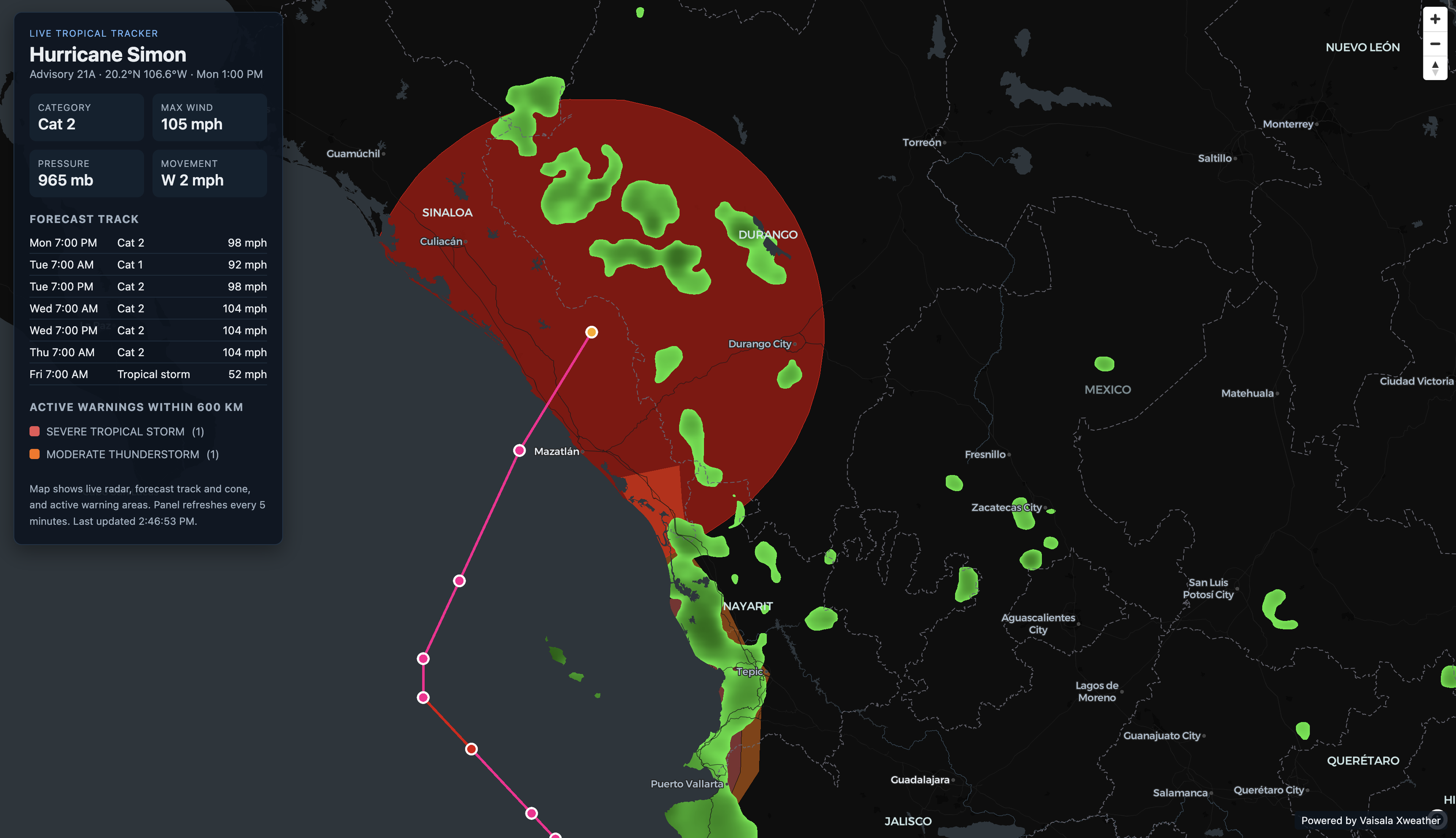
From a fresh install to a live Hurricane Simon tracker in three prompts. Typing is sped up and waiting time is cut.
For the demo, we tracked a live storm, Hurricane Simon, a Category 2 hurricane off the west coast of Mexico on October 12, 2026. Three prompts took a fresh install to a working tracker.
First, we asked whether any tropical cyclones were active. The Weather API skill found three active systems and picked out Simon, with 105 mph winds.
Next, before writing any code, we asked which APIs and map layers a public tracking page would need, and how many 5 minute visits the free tier could cover. It named the MapsGL layers and the Weather API endpoint, then showed the math.
MapsGL bills in sessions of 150 accesses, one for each 5 minute block on the clock. A 5 minute visit almost always crosses into a second block, so it uses two sessions.
The side panel adds one Weather API call.
That brings one visit to 301 accesses.
Every Xweather account gets 15,000 free accesses a month, enough for about 49 visits.
After that, pay as you go works out to about 18 cents a visit.
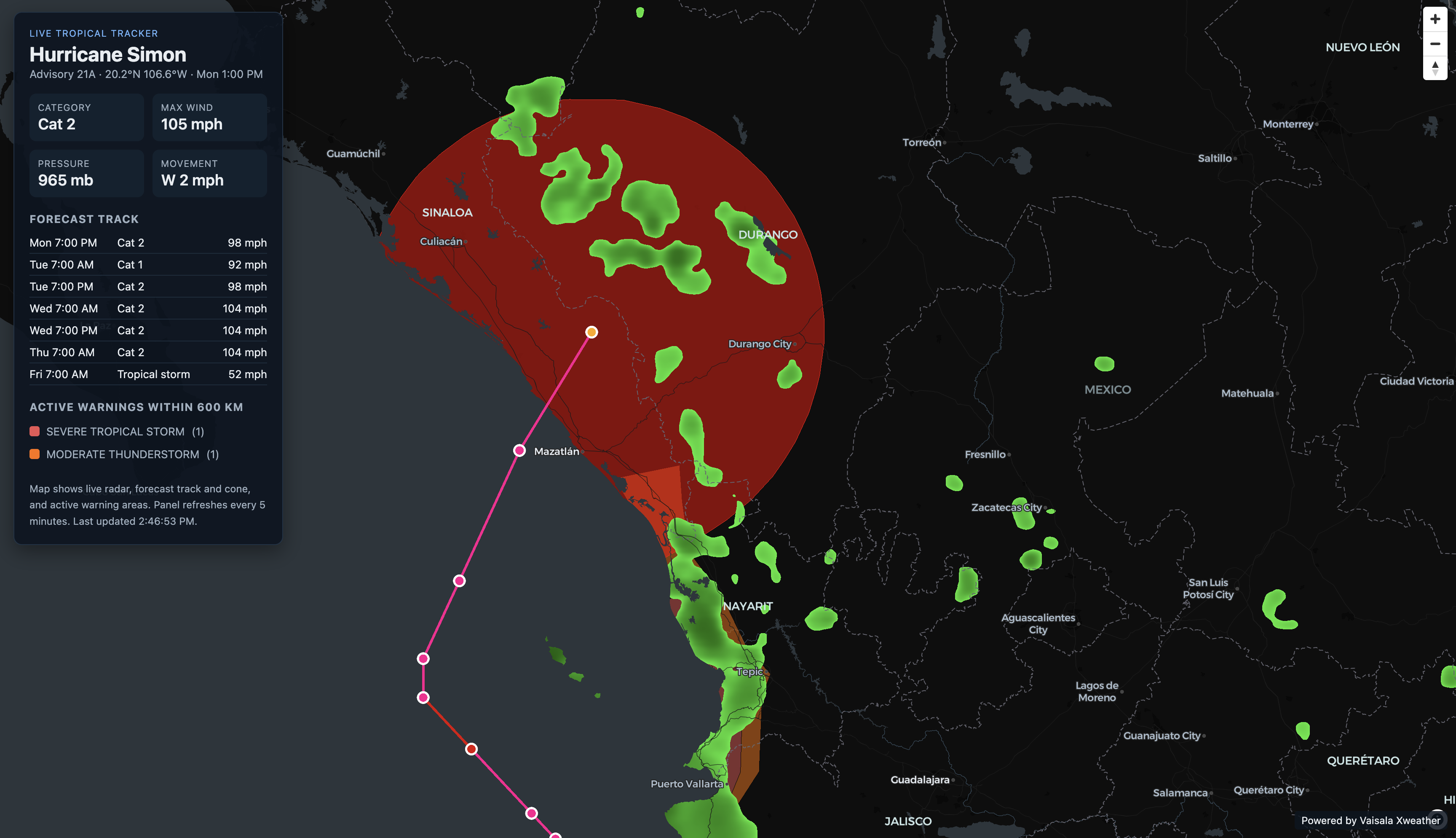
Then we asked it to build the page. The result is a single HTML page with MapLibre and MapsGL, showing live radar, Simon's forecast track and cone, and active warning areas. A side panel lists category, wind, pressure and movement, the forecast track through Friday, October 16, and active warnings within 600 km, and it refreshes every 5 minutes.
Sample prompts
Conversational. Ask a question, get an answer.
What's the hail risk in Dallas this week?
Show me active lightning near this driving route.
Alert me if a storm cell enters a 10 mile radius of this jobsite.
Is it safe to pour concrete at this site tomorrow morning?
Build. Use the skills like a pair programmer while you write code.
Add a MapsGL radar layer to this Mapbox map.
Query the Weather API for the nearest lightning strike within 10 miles of this point.
Set up a webhook that fires whenever a hailstorm enters this region.
Render a 12 hour wind and precipitation forecast as a visual timeline.
Getting started
You'll need an Xweather account for your client ID and secret. Don't have one yet? Sign up for free, and you'll get 15,000 accesses a month.
In Claude Code, run /plugin and search for Xweather, or run these three commands in order inside Claude Code.
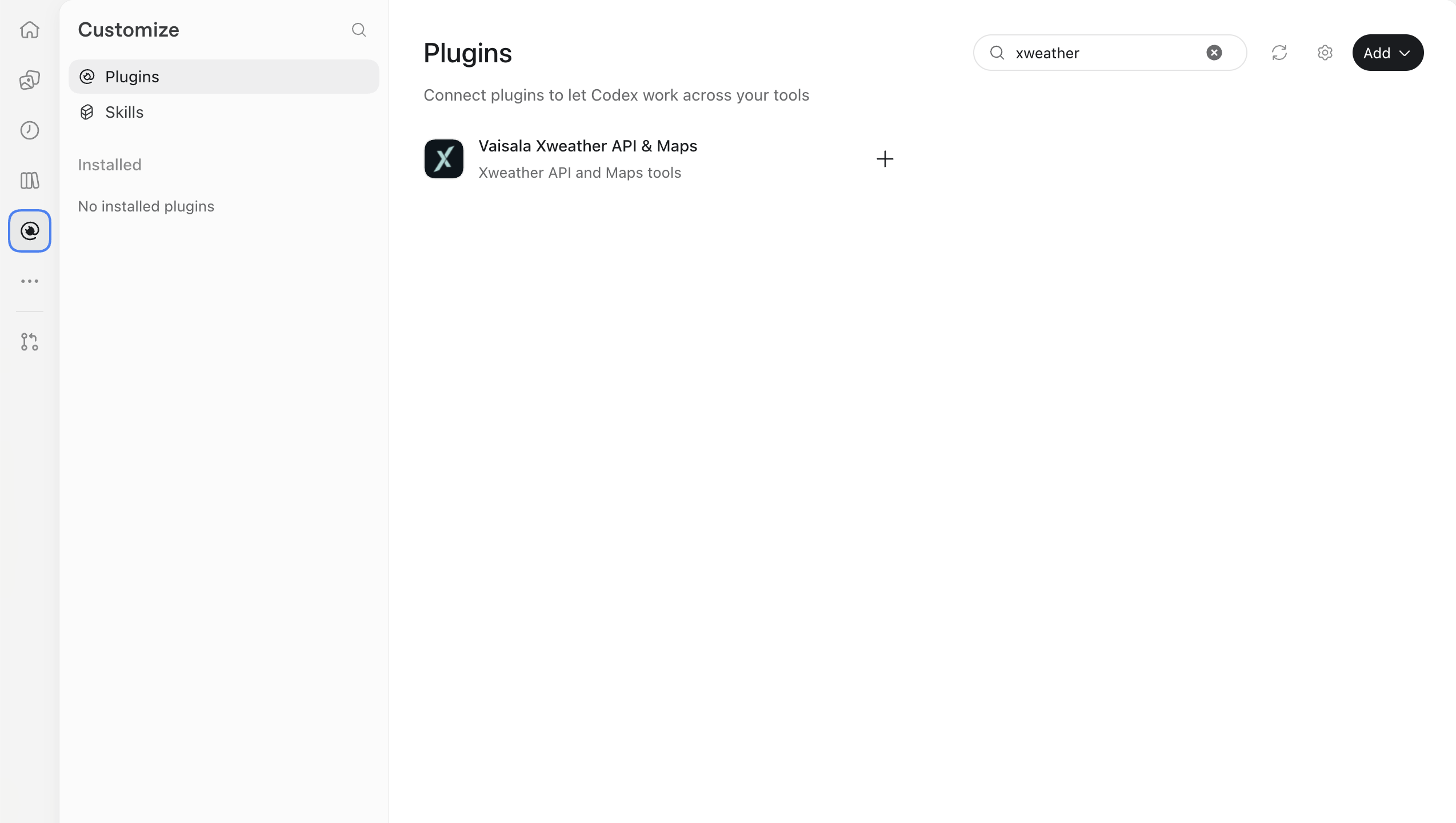
In the Codex app, open Plugins and search for Xweather. From the Codex CLI, the equivalent commands follow.
In ChatGPT, install the same skills from the Vaisala Xweather API & Maps plugin page.
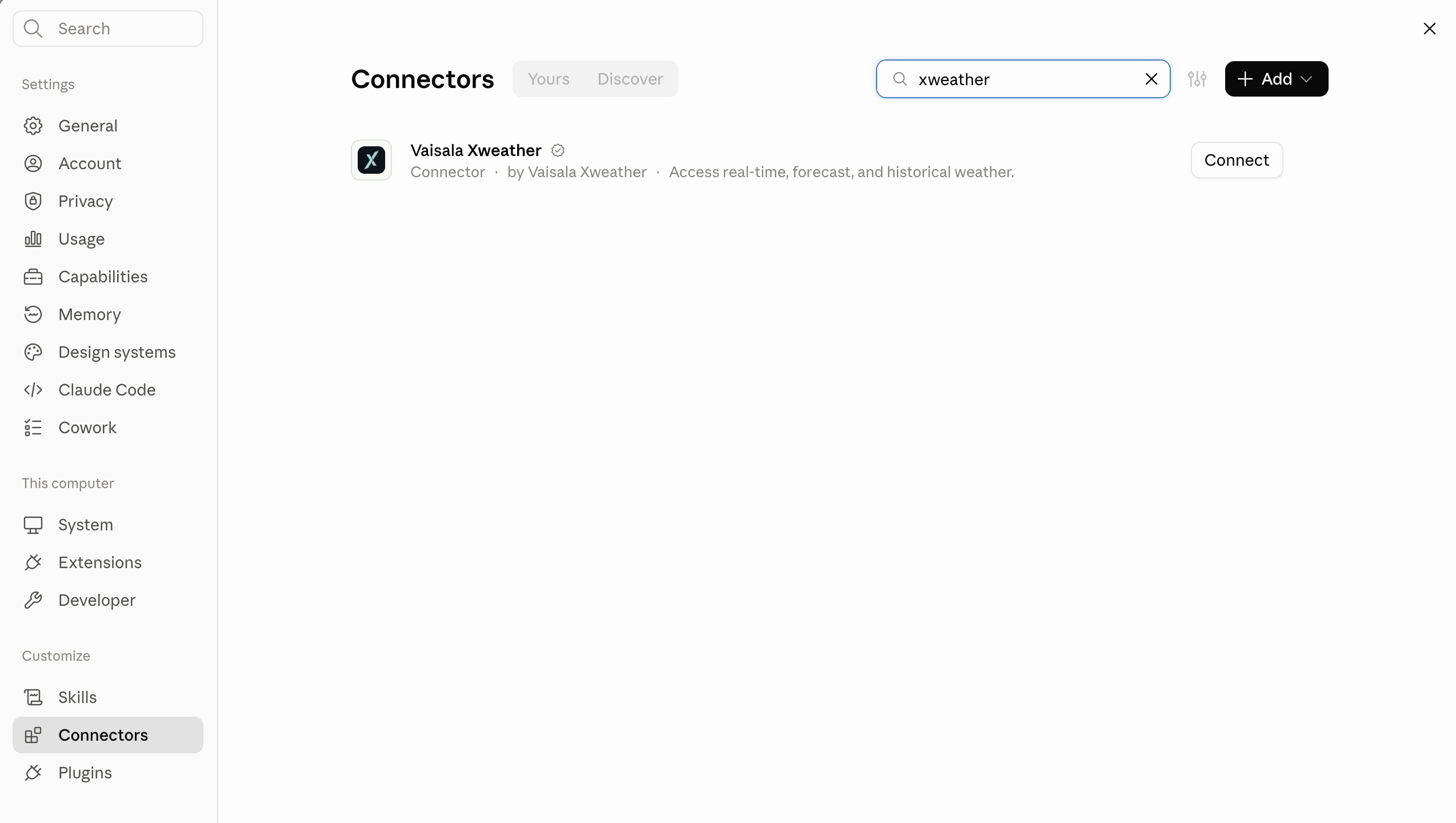
For live weather answers right in the chat, pair the skills with the Xweather MCP server. In Claude, open Settings, then Connectors, search for Xweather, and connect the verified Vaisala Xweather connector.
In Claude Code, run this in your terminal, replacing CLIENT_ID_CLIENT_SECRET with your client ID and secret joined by an underscore.
In ChatGPT, use the api_key query parameter instead, https://mcp.api.xweather.com/mcp?api_key=CLIENT_ID_CLIENT_SECRET. The token is the client ID and secret joined by a single underscore.
Try it yourself
Add Xweather to Claude or ChatGPT and ask it something real about the weather where you are right now.


